Last updated
Get MarketFlow AI ($29)How to See Which Content Drives Pipeline When Your Tools Don't Talk
Content attribution to revenue means tracing a closed deal back to the blog posts and pages that buyer read first. The data to do it usually exists already. It just sits in tools that never share it: your CRM holds the deals, your analytics holds the pages, and your SEO tool holds the rankings. This page shows how to join them by hand, and then with ready-made scripts.
Why can't you tell which blog posts bring in deals?
You cannot tell which blog posts bring in deals because the deal and the first visit live in two tools that never share data. Your CRM knows the deal size and close date. Your analytics knows the page and the traffic. Nothing links one row in the first tool to one row in the second.
Here is what that gap costs:
- Budget goes to the loud channel. Without proof, content loses to whatever channel has a dashboard.
- Friday becomes export day. Someone downloads CSV files from each tool and matches rows by hand.
- Each report is a one-off. The person who built it moves on, and nobody can rebuild it the same way.
- The CEO question stays open. "Which posts made us money?" gets a guess instead of a number.
I saw this on my own agency site. A 12-month Search Console review showed about 68% of its impressions came from developer searches that never turn into clients. Meanwhile, one section of profession pages converted at eight times the site average. I had been counting traffic. The useful question was which traffic.
The data is rarely missing. It is just never in one table.
How to connect content to revenue by hand, step by step
Connecting content to revenue by hand takes six steps: tag your links, store the first page on each contact, export deals, export pages, join the two on the URL, and add up the money. You can do all of it in a spreadsheet. Do it once by hand so you know what a clean result looks like.
- Define revenue. Use the amount on deals marked closed-won in your CRM. Ignore open deals for now, because they may never close.
- Tag every link you share. UTM codes are short labels added to a link, such as
utm_source=newsletter. They tell your analytics where a click came from. Google explains each one in its guide to campaign URLs with UTM parameters. - Store the first page on each contact. Make sure your CRM saves the first page a person landed on, plus its UTM values, when they fill in a form. If that field is empty, attribution is impossible for that contact.
- Export closed deals with their contacts. You want one row per deal with the deal amount, close date and contact email. The HubSpot API docs show how deals and contacts link if you later automate this.
- Export your pages. Pull a list of your pages with their traffic from GA4, and their top keywords from your SEO tool if you have one. Ahrefs sells API access on top plans; the Ahrefs developer docs list what is included.
- Clean the URLs. Make every URL lowercase, remove
https://,www.and any trailing slash, and strip the UTM part. Two versions of the same page will not match otherwise. This step causes most broken reports. - Join the tables. A join means matching rows from two lists that share a value, here the page URL. In a spreadsheet, use XLOOKUP. In Python, the pandas merge function does the same thing in one line.
- Pick one attribution model. First touch gives the deal to the first page. Last touch gives it to the last one. Google's guide to attribution models explains the options. Choose one and keep it every month.
- Add up revenue per page. Sum the deal amounts by page. Count how many rows did not match, too. If a third of your deals have no page, fix step 3 before you trust the totals.
Check your tracking before you trust any of it. On October 10, 2026, I found that the analytics on my agency site had collected nothing for a while. The script loaded, but its commands were in the wrong shape, and a browser check counted 0 collect requests. A join on empty data gives you a clean-looking table of zeros.
The first time takes a while. The real problem is week two, when you have to do it all again by hand and nothing has changed except the date.
I wrote about which marketing jobs are worth automating, and which are not, in Claude Code skills for marketing. Attribution sits firmly in the "automate it" pile, because the steps never change.
What click-based attribution cannot see
Some buyers read your post in a Slack thread, a forwarded email or a private message, then type your address in later. Analytics records that as a direct visit, so no page gets credit. Two habits help:
- Ask on the form. Add an optional "How did you hear about us?" field and store the answer on the contact. Compare it with the tracked first page each month.
- Report two numbers. Keep "sourced" revenue, where content was the first touch, apart from "assisted" revenue, where a buyer read a page later in the deal. Mixing them makes content look better or worse than it is.
Read the totals as a trend over months, not as exact money per post.
The faster way: Python scripts that join HubSpot deals to GA4 pages
The faster way is to let a script pull the data from each tool's API and run the same join on a schedule. MarketFlow AI is 11 systems of Python scripts. The one built for the content-to-deal question is revenue_attribution.py in the revenue intelligence folder. It reads closed-won deals and the pages each buyer viewed from HubSpot, and page traffic from GA4.
The bar is low but real: you need to run a script in a terminal and put API keys in an environment file. I like this approach because no-code tools kept failing at the one step that matters, the join across whole tables. Ahrefs and Gong come in through a separate client report script. Apollo is only used by the outbound scripts, to search for leads, not for attribution.
How to use it, step by step
- Buy and download. Gumroad sends the files right after payment.
- Install Python 3.9 or newer, then run
pip install -r requirements.txtinside each folder you plan to use. Each folder has its own requirements file. - Run the attribution script once with no keys. It prints a warning and builds a demo report from built-in sample data. That shows you the format before you connect anything.
- Add your keys. Set a HubSpot private app token, your GA4 property ID and a GA4 service account file as environment variables.
- Run the report. Use
python revenue_attribution.py --reportand pick a model with--model, such as first-touch. Add--jsonand--outputto save the result as a JSON file. - Schedule it weekly with cron or Windows Task Scheduler, so the report is ready on Monday.
- Check for gaps. Run it with
--gapsto see which funnel stages have no content working for them.
Two cautions from reading the code. If a key is wrong, the script warns you and falls back to the sample data, so read the warnings before you trust a total. It also matches HubSpot page addresses to GA4 page paths exactly, with no cleanup, so do step 6 of the manual method first.
If the report shows that content brings deals but outbound does not, the outbound side needs its own fix. B2B Growth Machine covers targeting and cold email setup.
What the output looks like
The report prints in your terminal. It opens with a summary: total revenue, number of deals, average deal size, how many pieces of content got credit and average touchpoints per deal. Then comes a table of revenue by content type, such as blog, case study and landing page, with sessions, piece count and average revenue per piece. Each page gets a row with its credited revenue, sessions and deals touched.
How much time it saves
I have not timed a full run against my own CRM, so I will not give you a number. The bigger win is trust. When the same script runs every week, a change in the numbers means something changed in the business, not in how someone built the spreadsheet.
// what it looks like
Inside MarketFlow AI


Want the join without the Friday CSV ritual? MarketFlow AI runs it as a script you can schedule.
Get MarketFlow AI, $29 one-time// side by side
By hand vs a generic AI prompt vs MarketFlow AI
The answer you want is the same in all three columns: which pages touched deals that closed. What changes is how many exports you stitch by hand, and whether the join is the same every week.
| Criterion | By hand | Generic AI prompt | MarketFlow AI |
|---|---|---|---|
| Time per report | Several exports and lookups, every time | Faster formulas, but you still export and paste every file | One command once keys are set; I have not published a timing |
| Same method each week | Depends on who builds the sheet | No; a new chat may join the data differently | Yes; the same script runs the same join |
| Reads live tool data | Only through CSV exports | Only what you upload or paste | Yes, GA4 and HubSpot through their APIs with your own keys |
| Handles messy URLs | If you remember to clean them | Sometimes; results vary between runs | No cleanup step; it matches page addresses exactly, so clean them first |
| Skill needed | Spreadsheet lookups | Good prompts and careful checking | Run a Python script and fill in an environment file |
| Cost | Your hours | Your AI plan | $29 once, plus the API access your tools include |
// in the download
What is inside MarketFlow AI
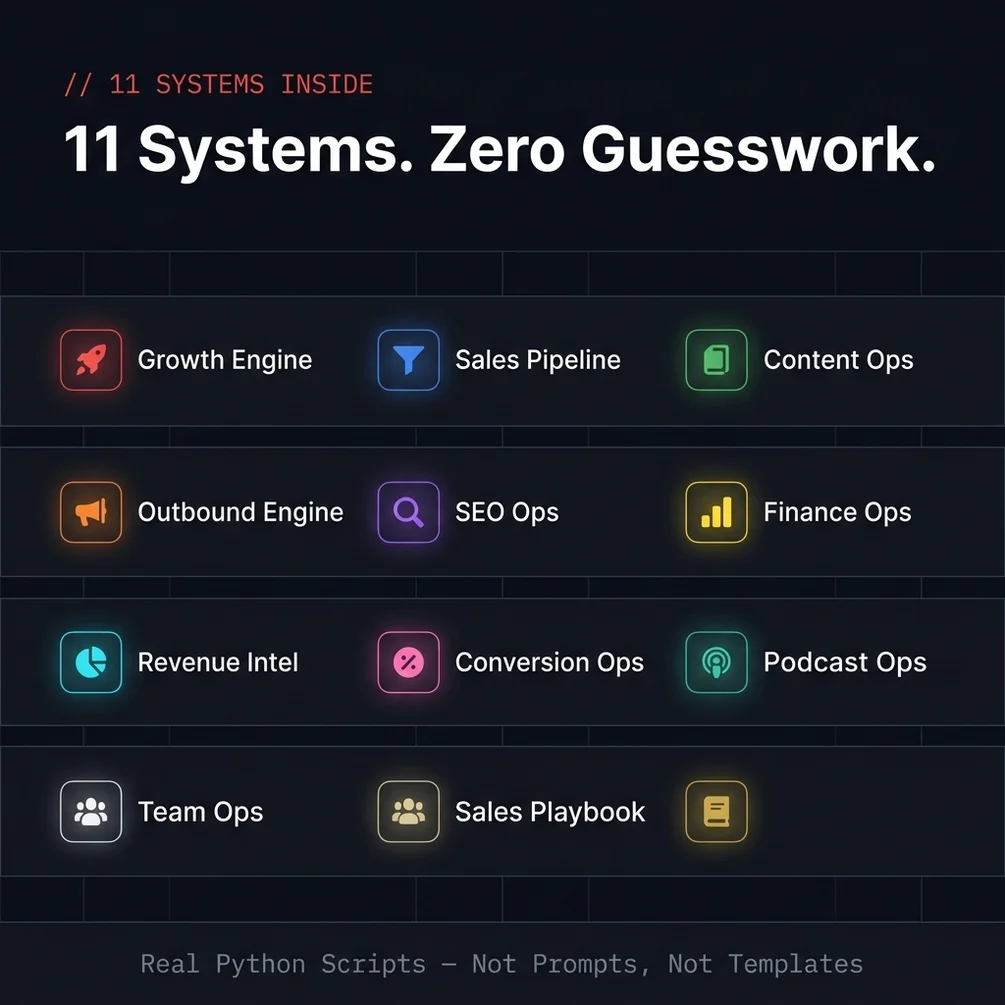
MarketFlow AI is 11 marketing and sales systems, each a folder of Python scripts with a Claude Code skill file. The revenue scripts read GA4 and HubSpot through their APIs. Others cover A/B tests, outbound, SEO, content and sales calls.
- 11 systems, each a folder of Python scripts with its own README, requirements file and Claude Code skill file
- revenue_attribution.py: credits closed HubSpot deals to pages, with first-touch, last-touch, linear and time-decay models
- A client report script that combines GA4, HubSpot, Ahrefs and Gong into Markdown or JSON
- A sales call script that pulls objections and buying signals from Gong or plain text transcripts
- An A/B testing engine with significance checks that needs no outside API
- Outbound scripts that search Apollo, verify emails and upload leads to Instantly
- SEO ops, content ops and finance scripts, some of which work on local files only
What you do not get
- No Salesforce, Pipedrive or Zoho support. The deal scripts read HubSpot.
- No CSV or spreadsheet export. Reports print in the terminal or save as JSON or Markdown.
- No dashboard app. Everything runs from the command line or through Claude Code.
Who MarketFlow AI is for, and who should skip it
This kit fits B2B marketers who already use HubSpot and GA4 and can run a script from a terminal. It does not fit teams on another CRM, or anyone who will not open a terminal at all.
It is for you if
- You spend Friday afternoons stitching CSV exports from four different platforms.
- You know a deal closed but cannot trace which content touched it.
- You hit a Zapier limit, saw the upgrade price, and started looking for another way.
- You can run a Python script from a terminal but do not want to write one.
It is not for you if
- You cannot or will not open a terminal. The bar is running a Python script, but it is a real bar.
- Your CRM is not HubSpot. The deal and attribution scripts do not cover other CRMs.
- You run a B2C shop on simple funnels. This kit is built around B2B pipeline and revenue joins.
// frequently asked
Questions buyers ask
- What is content attribution to revenue?
- Content attribution to revenue is matching closed deals to the content those buyers read before they bought. It answers which blog posts and pages helped make money, not just which ones got visits. It needs two things joined: deal data from your CRM and page data from your site.
- Which attribution model should I start with?
- Start with first touch: give the deal to the first page the buyer landed on. It is simple and easy to explain to a boss. Once that works, compare it with last touch or an even split across every page touched. Different models give different answers, so pick one and use it every month.
- Do I need coding skills to use MarketFlow AI?
- No script writing is needed. You need Python 3.9 or newer, to run pip install -r requirements.txt inside each folder you use, and to copy the example environment file and add your keys. That is the bar.
- Does it work with ChatGPT?
- The scripts run on your own computer with Python, not inside ChatGPT. You can paste a script into any AI chat to have it explained. Each system also ships a skill file for Claude Code, where you can ask for a run or a change in plain English.
- Is it a one-time payment?
- Yes, MarketFlow AI costs $29 once with no subscription. Your own HubSpot, Google, Gong, Ahrefs or Apollo plans are separate, and API access depends on the plan you already have with each tool.
- Do I need API keys for all the tools?
- Only for the tools you connect. The getting started guide says the growth engine needs no outside APIs, and the finance and team scripts work on local files. The attribution script needs a HubSpot private app token and a GA4 service account.
- I am on Salesforce. Can I still use this?
- Not for attribution. The deal scripts read HubSpot, and there are no Salesforce versions in the download. The A/B testing, content and SEO scripts do not depend on your CRM, so those still work.
- How is this different from Zapier or Make?
- Zapier and Make are good at moving one record from one app to another. Attribution needs a join across whole tables, plus cleanup and scoring. A Python script does that in one run. Many teams keep Zapier for simple handoffs and use scripts for the reporting.
Get MarketFlow AI
MarketFlow AI costs $29 as a one-time payment. You get an instant download, lifetime access to every v1 update, and no subscription.
// next problem
Related problems
- Why your B2B cold emails get no replies
If the report shows content works but outbound does not, this is the fix for the outbound side.
- Getting traffic but no sales from your pages
When a page brings visitors but no deals, the leak is on the page. This finds where.
- How to run a full SEO audit with Claude Code
Once you know which pages make money, this keeps those pages healthy in search.
// Also on this topic
- guideI automated my admin, but I keep checking if it actually ran. Is that normal?
You automated the work and now you watch it all day. Here is why the checking happens, and how to set things up so silence means fine.
- guideCan one person really do a marketing department's work alone with AI?
AI can draft what a marketing team produces, but not decide what is you. See where the line falls, and why to start with one department, not four.
- free toolPlatform fee comparison
One price against 7 platforms and 13 fee variants, sorted by take-home.
- bookThe Leverage Stack
How One Person Runs What Used to Take a Team